


A cloud phone system gives small businesses a modern way to make, receive, route, and manage calls without relying on traditional landlines or bulky on-site phone equipment. Instead of running calls through old copper lines or an office-based PBX, your phone system is hosted securely in the cloud and accessed through desk phones, mobiles, laptops, or desktop apps.
For many small businesses, this makes communication simpler, more flexible, and easier to scale. It can also reduce the cost and complexity of maintaining a traditional business phone system, especially for teams that work across offices, homes, and customer sites.
In this guide, we explain what a cloud phone system is, how much it costs, which features matter most, and how to choose the best setup for your small business.
Key Takeaways
- A cloud phone system lets your business make and receive calls over the internet rather than through traditional landlines.
- Small businesses usually pay a monthly cost per user, with pricing depending on features, call bundles, support, handsets, and setup requirements.
- Useful features include call routing, auto attendant menus, voicemail to email, call recording, mobile apps, analytics, and CRM integrations.
- Cloud systems are well suited to small businesses because they are flexible, scalable, and easier to manage than traditional phone systems.
- The right provider should help with number porting, setup, training, support, and making sure your internet connection is ready for reliable call quality.
What Is a Cloud Phone System for Small Business?
A cloud phone system is a business phone system that is hosted online rather than installed on physical hardware in your office. It uses VoIP, which stands for Voice over Internet Protocol, to send voice calls over your internet connection.
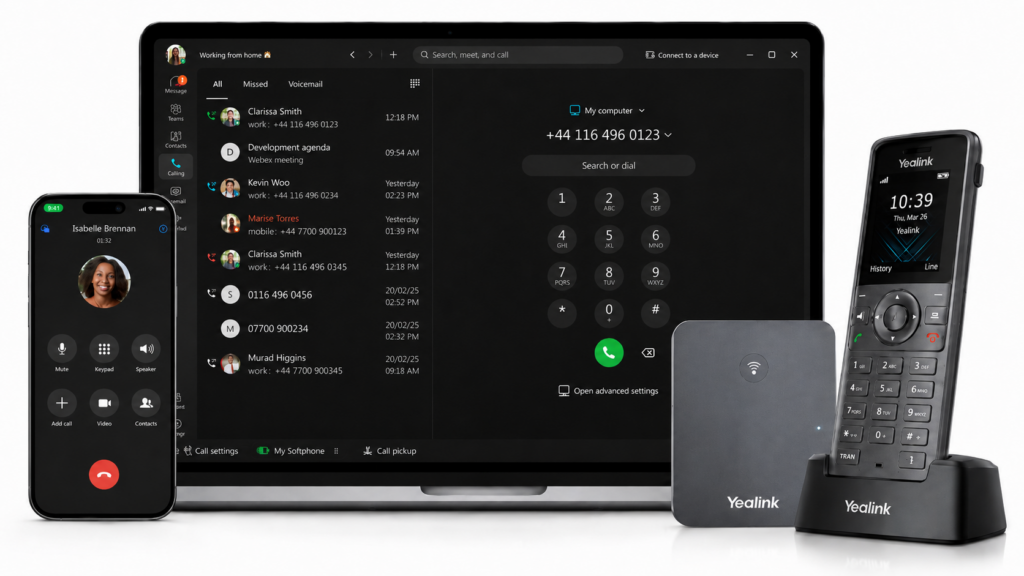
For a small business, this means your team can make and receive business calls from different devices, including:
- VoIP desk phones
- Mobile phones
- Desktop computers
- Laptops
- Softphone apps
- Web-based calling tools
Instead of being tied to one physical office line, your phone system is managed through a cloud platform. You can add users, change call routing, set up voicemail, review call analytics, and manage features through an online portal.
A cloud-based phone system for small business is especially useful if you have remote workers, hybrid teams, multiple locations, or staff who need to take business calls while away from the office.

How Does a Cloud Phone System Work?
When someone makes a call using a cloud phone system, the voice is converted into digital data and sent over the internet – this is called Voice over Internet Protocol (learn more). The cloud platform then routes the call to the right destination, whether that is another business number, a mobile phone, a desk phone, or a voicemail inbox.
For users, the experience is straightforward. They dial and receive calls as normal, but the system behind the scenes is far more flexible than a traditional landline setup.
A typical small business cloud phone setup includes:
- Business phone numbers
- User accounts or licences
- Desk phones, softphones, or mobile apps
- Call routing rules
- Voicemail settings
- Call recording or reporting features
- An admin portal for managing the system
- Support from the phone system provider
Because the platform is hosted in the cloud, your business does not need to maintain a large phone cabinet, on-site PBX, or complex telecoms hardware.
How Much Does a Cloud Phone System Cost for a Small Business?
Cloud phone system costs vary depending on the provider, number of users, features, call packages, hardware, and support level. Most small businesses pay a monthly fee per user rather than a large upfront cost.
As a general guide, many small business cloud phone systems are priced on a per-user, per-month basis. Entry-level packages may cover essential calling features, while higher-tier packages may include advanced call management, reporting, call recording, CRM integrations, and contact centre-style tools.
Typical Monthly Cost Per User
A small business can usually expect cloud phone system pricing to include some or all of the following:
- Monthly user licences
- UK calling packages
- Business phone numbers
- Voicemail and call routing
- Mobile or desktop apps
- Admin portal access
- Support and maintenance
- Optional call recording or analytics
- Optional integrations with CRM or Microsoft Teams
Pricing can vary between £10-25 per user, however the cheapest package is not always the best option. A low monthly price can become expensive if key features, support, call bundles, setup, or hardware are charged separately.
When comparing providers, ask what is included in the monthly fee and what costs extra.
Setup Costs, Hardware Costs and Number Porting
Some cloud phone systems can be set up with little or no hardware if your team uses mobile and desktop apps. Others may require VoIP desk phones, headsets, or network checks.
Possible setup costs include:
- New desk phones or headsets
- Installation and configuration
- Number porting
- Call flow setup
- User training
- Internet or network upgrades
- Router configuration
- Microsoft Teams or CRM integration setup
Number porting is particularly important. If you want to keep your existing business phone numbers, your provider should manage the porting process and explain how long it will take.
Cloud Phone System Cost vs Traditional Phone System Cost
| Cost Area | Traditional Phone System | Cloud Phone System | Small Business Impact |
|---|---|---|---|
| Upfront cost | Often higher due to hardware and installation | Usually lower, especially if using apps or existing devices | Easier to adopt without major capital spend |
| Monthly costs | Line rental, maintenance, call charges | Per-user monthly pricing | More predictable budgeting |
| Maintenance | Often requires engineer visits or hardware support | Managed by provider | Less internal admin |
| Adding users | May require new lines or hardware changes | Add users through a portal | Easier to scale |
| Remote working | Limited or requires workarounds | Built in through apps and routing | Better for hybrid teams |
| Features | Often basic unless upgraded | Many features included as standard | More professional call handling |
For small businesses, the biggest financial benefit is often predictability. Instead of dealing with separate bills for lines, maintenance, calls, and upgrades, a cloud phone system can consolidate costs into a clearer monthly package.
Key Features to Look For in a Small Business Phone System
A good small business phone system should do more than simply make and receive calls. The right features can help you answer more enquiries, reduce missed calls, improve customer experience, and make your team easier to manage.
Call Routing and Call Forwarding
Call routing controls where incoming calls go. For example, calls can be sent to a sales team, support team, individual user, mobile phone, voicemail box, or overflow group.
For small businesses, this is useful because it helps avoid missed calls when someone is unavailable. You can also route calls differently during business hours, lunch breaks, weekends, or holidays.
Auto Attendant
An auto attendant greets callers with a menu, such as “Press 1 for sales, press 2 for support.” This helps create a professional first impression and sends callers to the right person or department quickly.
Even a small team can sound more organised with a simple call menu.
Voicemail to Email
Voicemail to email sends voicemail messages directly to a user’s inbox. Some systems include an audio file, transcription, or notification.
This is helpful for busy teams because staff can check messages without logging into a separate voicemail system.
Call Recording
Call recording can be useful for training, quality monitoring, dispute resolution, and compliance. Not every small business needs it, but it is valuable for businesses that handle customer enquiries, bookings, sales calls, or regulated conversations.
If you plan to record calls, make sure your provider explains storage, permissions, retention periods, and any compliance considerations.
Mobile and Desktop Apps
Mobile and desktop apps allow staff to use their business number from a smartphone, laptop, or computer. This is one of the biggest advantages of a cloud phone system for small businesses.
It means team members can work from home, visit clients, travel, or move between offices while still using the same business phone identity.
Call Analytics and Reporting
Call analytics help you understand how your business handles calls. Reports may show call volumes, missed calls, answer times, busy periods, and individual user activity.
For small businesses, this can reveal practical issues such as:
- Too many missed calls during lunch breaks
- Not enough staff answering during peak times
- Calls going to the wrong team
- Enquiries being missed outside business hours
CRM and Microsoft Teams Integration
Some cloud phone systems integrate with CRM platforms, Microsoft Teams, helpdesk software, or productivity tools.
A CRM integration can log calls against customer records, while Microsoft Teams integration can allow users to make and receive external calls through Teams. These integrations are useful if your team already spends most of its day inside those platforms.
Admin Portal and User Management
A good cloud phone system should give you control through a simple online admin portal. This allows you to add users, change call routing, update greetings, review reports, and manage settings without waiting for an engineer.
For small businesses, this saves time and makes the system easier to manage as the team changes.
Benefits of a Cloud Phone System for Small Businesses
Cloud phone systems are popular with small businesses because they solve several common communication problems at once: cost, flexibility, professionalism, and scalability.
Lower and More Predictable Costs
Traditional phone systems can involve line rental, call charges, maintenance, hardware, and engineer visits. A cloud-based business phone system usually replaces much of this with a monthly package.
This makes budgeting easier and helps reduce the risk of unexpected telecoms costs.
Better Support for Hybrid and Remote Working
A cloud phone system is not tied to one desk or one office. Staff can make and receive business calls from different locations using an app, browser, laptop, mobile, or desk phone.
This is ideal for businesses with:
- Remote workers
- Hybrid teams
- Field-based staff
- Multiple offices
- Part-time employees
- Staff who travel between sites
Easy Scalability as Your Team Grows
With a traditional phone system, adding new users may require extra lines, handsets, or engineer support. With a cloud phone system, adding or removing users is usually much simpler.
This is useful for growing businesses, seasonal teams, and companies that need to adapt quickly.
More Professional Customer Experience
Small businesses can use cloud phone features to create a more professional experience for callers. Auto attendants, call queues, voicemail to email, call routing, and out-of-hours messages all help customers reach the right person more easily.
Even a small team can offer a more polished phone experience without needing a full-time receptionist.
Less Hardware and Maintenance
Because the system is hosted in the cloud, your business does not need to maintain a large on-site phone system. Your provider manages much of the platform, updates, and core infrastructure.
This frees your team from the hassle of maintaining telecoms hardware and makes the system easier to support.
Better Business Continuity
If your office has a power cut, local issue, or disruption, calls can often be redirected to mobiles, another site, or voicemail. This helps your business stay reachable even when something goes wrong.
Business continuity is an important factor when choosing a cloud phone system, especially if missed calls mean missed sales or poor customer service.
Cloud Phone System vs Traditional Landline vs On-Premise PBX
| Feature | Traditional Landline | On-Premise PBX | Cloud Phone System |
|---|---|---|---|
| Call technology | Copper or legacy phone lines | Office-based phone hardware | Internet-based VoIP |
| Upfront cost | Low to medium | Often high | Usually low to medium |
| Maintenance | Provider or engineer support | Internal or external maintenance | Mostly managed by provider |
| Remote working | Limited | Limited unless configured | Built in |
| Scalability | Limited by lines | Requires hardware planning | Add or remove users easily |
| Features | Basic | Depends on system | Modern features available |
| Disaster recovery | Limited | Depends on setup | Call routing can redirect calls |
| Future readiness | Being phased out | Depends on compatibility | Built for modern connectivity |
For most small businesses, a cloud phone system offers the best balance of cost, flexibility, and functionality.
What the UK Landline Switch-Off Means for Small Businesses
The UK is moving away from traditional analogue phone lines and towards digital phone services. This means small businesses that still rely on old landline systems will need to move to a modern alternative.
A cloud phone system is one of the most common replacements because it is digital, flexible, and built around internet-based calling.
This does not mean every small business needs to rush into the first available solution. It does mean you should review your current setup, check when your existing services may be affected, and plan a sensible migration before your old system becomes a problem.
How to Choose the Best Cloud Phone System for Your Small Business
Choosing the best cloud phone system is not just about finding the cheapest monthly price. The right choice depends on your team, call volume, features, support needs, and future plans.
Step 1: Check Your Current Phone Setup
Start by reviewing what you already have. Consider:
- How many phone lines you use
- How many users need access
- Which numbers you want to keep
- How calls are currently routed
- Which features you already use
- What problems your current system creates
This gives you a clear starting point before comparing providers.
Step 2: Count Users, Devices and Call Volumes
Work out how many people need a phone licence and which devices they will use. Some users may need desk phones, while others may only need mobile or desktop apps.
You should also estimate call volumes. A small office with occasional calls will need a different setup from a sales team, customer service team, or business that handles lots of inbound enquiries.
Step 3: Decide Which Features You Actually Need
It is easy to be distracted by long feature lists. Focus on the features that solve real business problems.
For example:
- If you miss calls, prioritise call routing and voicemail to email.
- If customers often need different departments, use an auto attendant.
- If staff work remotely, prioritise mobile and desktop apps.
- If you need quality monitoring, look for call recording and analytics.
- If your team uses a CRM, ask about integration.
Step 4: Check Internet Readiness and Call Quality
Cloud phone systems rely on a stable internet connection. Before switching, check whether your broadband, router, Wi-Fi, and internal network are ready for voice calls.
The amount of bandwidth required is dependent on a number of factors such as number of users, equipment and service used. Some providers (like ourselves) have tools you can run to test to make sure your internet connection is suitable for our VoIP platform.
If you are on slow legacy broadband line, you may wish to review your options and upgrade to Full-Fibre should this be available to your business premises. You can use our broadband availability checker to help you get started.
Step 5: Compare Support, Contracts and SLAs
Support matters. If phones are critical to your business, you need to know what happens when something goes wrong.
Ask providers:
- Is support UK-based?
- What are the support hours?
- Is there a guaranteed response time?
- Do they offer onboarding and training?
- Is there a service level agreement?
- Are contracts monthly, annual, or longer?
- What happens if you need to add or remove users?
Additional tip: Don’t forget to check any prospective suppliers reviews using Google and TrustPilot.
Step 6: Ask About Number Porting and Migration
If you already have established business phone numbers, keeping them is usually essential. Ask how the provider handles number porting, how long it takes, and what happens during the transfer.
A good provider should plan the migration carefully so your business avoids unnecessary downtime.
Is Our VoIP Phone System Right for Your Small Business?
If you are comparing cloud phone systems for your small business, our VoIP Phone System is designed to give growing teams the features of a traditional business phone system without the cost or complexity of on-site hardware.
It can support office-based, hybrid, and remote teams with modern call handling tools, flexible user setup, and business calling across desk phones, mobiles, and desktop apps.
Our VoIP Phone System may be a good fit if you want:
- A cloud-based business phone system that is simple to manage
- Call routing to reduce missed calls
- Mobile and desktop access for flexible working
- Number porting so you can keep your existing business numbers
- Scalable users as your team grows
- Professional features such as voicemail, call recording, and auto attendant menus
- Excellent-rated UK support team to help assist you with setup, migration, and ongoing changes
The best way to decide is to review your users, current phone setup, call volume, existing numbers, and must-have features. From there, we can recommend a system that fits how your business actually works.
Cloud Phone System FAQs
How much does a cloud phone system cost for a small business?
Cloud phone system costs usually depend on the number of users, features, call packages, hardware, and support requirements. Most small businesses pay a monthly fee per user, with possible additional costs for desk phones, setup, integrations, or number porting.
Is a cloud phone system better than a landline?
For many small businesses, yes. A cloud phone system is usually more flexible, easier to scale, and better suited to remote or hybrid working. It also provides features that traditional landlines often lack, such as call routing, voicemail to email, mobile apps, and analytics.
Can I keep my existing business phone number?
In most cases, yes. Keeping your existing number is handled through a process called number porting. Your provider should manage this process and explain the expected timescales before the switch takes place.
Do I need new desk phones?
Not always. Some businesses use VoIP desk phones, while others use desktop apps, mobile apps, or headsets. The right setup depends on how your team works and whether staff prefer physical handsets or app-based calling.
Can staff use mobiles or laptops?
Yes. Most cloud phone systems allow users to make and receive business calls through mobile and desktop apps. This is one of the main reasons small businesses choose cloud phone systems.
What internet speed do I need for a cloud phone system?
The required speed depends on the number of simultaneous calls and the quality of your connection. Stability, latency, and network quality are just as important as headline broadband speed. Your provider should help assess whether your connection is suitable.
What happens if my internet goes down?
Many cloud phone systems can redirect calls to mobiles, voicemail, or another location if your office internet connection fails. Ask your provider about backup options and disaster recovery features.
Is a cloud phone system secure?
A reputable cloud phone system should include appropriate security features, access controls, and platform protections. You should ask providers about encryption, account security, user permissions, data handling, and compliance requirements.
How long does setup take?
Setup time depends on the number of users, handsets, call flows, integrations, and whether you are porting existing numbers. A simple new setup may be quick, while a full migration with number porting can take longer.
What is the best cloud phone system for a small business?
The best cloud phone system is the one that fits your business needs, budget, team structure, and support requirements. Look for transparent pricing, reliable call quality, useful features, easy management, strong support, and a clear migration process.
Ready to Choose a Cloud Phone System for Your Small Business?
A cloud phone system can help your small business reduce telecoms complexity, support flexible working, and improve how calls are handled. The key is choosing a system that fits your team rather than paying for features you do not need.
If you are reviewing your current phone setup or planning a move from landlines to VoIP, check out our pricing and features. We can help you compare options, understand costs, plan number porting, and choose a cloud phone system that supports the way your business works.