


A business device might contain access to Microsoft 365, customer information, company files and other sensitive data. However businesses think that simply installing an anti-virus means their devices are secured.
At Globe2, we take a layered approach to device security. We look at how a device is configured, who has access to it, whether software is kept up to date, how threats are detected and what happens when something requires our attention.
Just as importantly, security is not something we configure once and forget about. For our managed IT customers, securing devices and supporting them is an ongoing process.
Here is how we approach it:
1. We start with a secure device configuration
Good security starts before a new computer is put into everyday use.
When setting up and managing business devices, we make sure they are appropriately configured for the business and the person who will be using them.
This can include applying the appropriate Windows security settings, installing required business applications and removing software that is unnecessary.
We also consider how the device fits into the wider business environment. A laptop used by somebody working remotely, for example, can present different risks to a desktop computer that never leaves an office.
The objective is to give the employee everything they need to do their job without unnecessarily increasing the attack surface of the device.
2. We separate everyday and administrative access
One of the principles we apply when securing devices is limiting administrative privileges.
Giving an employee unrestricted administrator access to their computer can make it easier for malicious software, unwanted applications or an attacker to make significant changes to the device. Where appropriate, users therefore work using standard user accounts, with administrative access kept separate.
When administrator privileges are required for legitimate maintenance or support, they can be provided through an access request directly from their device.
It is a relatively simple security measure, but it can make an important difference if an account or device is compromised.
3. We keep Windows and applications up to date
Software vulnerabilities are continually discovered in Windows, browsers, productivity software and other applications. Once a security vulnerability becomes publicly known, attackers may actively look for computers that have not yet been patched.
This is why we don’t want to rely entirely on employees remembering to check for and install updates themselves.
As part of our managed IT services, we can monitor the patch status of customer devices and manage the deployment of updates. This gives us visibility over devices that are missing important updates and allows us to take action when necessary. We also keep an eye on software that has reached, or is approaching, the end of its supported life.
An application can continue working perfectly well after the manufacturer stops supporting it, but that doesn’t mean it remains safe to use.
Keeping operating systems and applications supported and appropriately patched is also an important part of meeting security frameworks such as Cyber Essentials.
4. We deploy managed endpoint protection
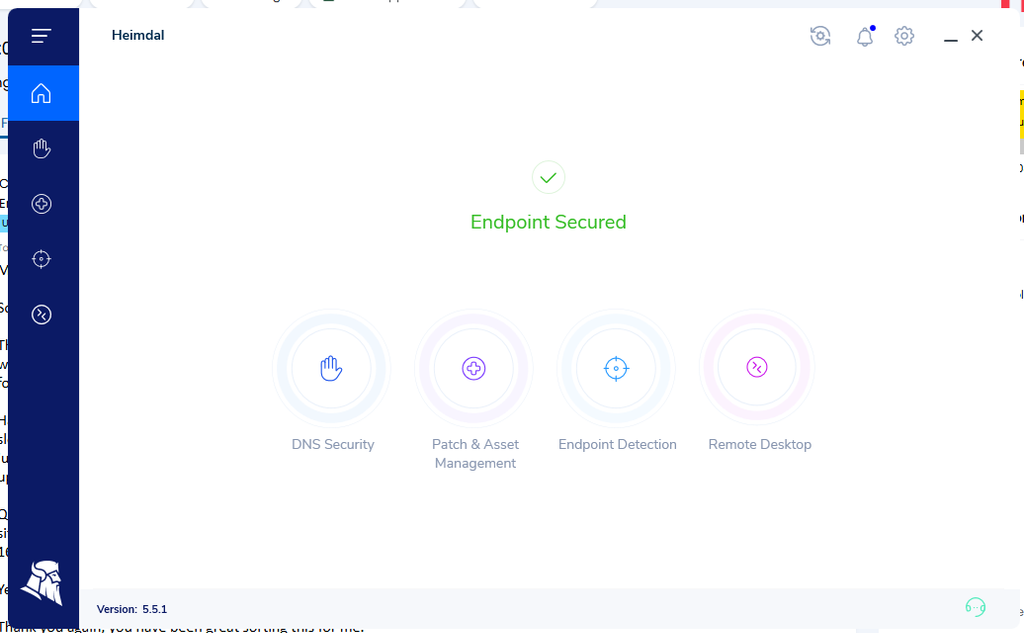
Traditional antivirus is only one part of modern endpoint security.
Business devices need protection capable of identifying malicious files, suspicious activity and other potential threats. Depending on the customer’s requirements and the services we are providing, we deploy and manage appropriate endpoint-security technologies across customer devices.
The important distinction is the word managed.
Installing security software is only useful if it is running correctly, receiving updates and somebody is paying attention when it detects something.
For managed customers, our role doesn’t end when the security software has been installed. We can monitor the health of protected devices and investigate alerts that require attention.
5. We protect devices with encryption
A cyberattack isn’t the only way company information can be exposed.
Laptops get lost. They are left on trains, stolen from cars and occasionally disappear with former employees. This is why disk encryption can be an important part of securing portable business devices.
Where appropriate, technologies such as BitLocker can be used to encrypt the information stored on a Windows device.
Encryption means that simply removing the drive or starting the computer using another operating system should not provide an attacker with unrestricted access to the information stored on it.
We also consider how recovery information is managed. Encryption is much less useful operationally if nobody can recover a legitimate device when something goes wrong.
6. We protect the identity behind the device
Securing a laptop while ignoring the accounts used on it would leave a significant gap.
For many businesses, Microsoft 365 provides access to email, SharePoint, OneDrive, Teams and other important company information. An attacker may not need to compromise the physical computer if they can steal an employee’s Microsoft 365 credentials instead.
Device security therefore forms part of a wider security strategy.
This can include measures such as:
- Multi-factor authentication (sometimes called 2FA)
- Appropriate account permissions
- Secure administrative accounts
- Microsoft 365 security policies
- Controlled access to company information
- Password management
- Monitoring and responding to suspicious activity
The exact controls we recommend depend on the organisation rather than applying an identical configuration to every customer.
7. We don’t give everyone access to everything
The principle of least privilege is simple: somebody should have access to what they need to perform their job, but not automatically have access to everything else.
We apply this principle to both devices and cloud services.
For example, an employee shouldn’t normally need administrative access simply because they use a company laptop. Likewise, somebody working in one department may not need access to sensitive information belonging to another.
Reducing unnecessary access can limit the potential impact if an employee’s account or device is compromised.
8. We monitor devices after they have been deployed
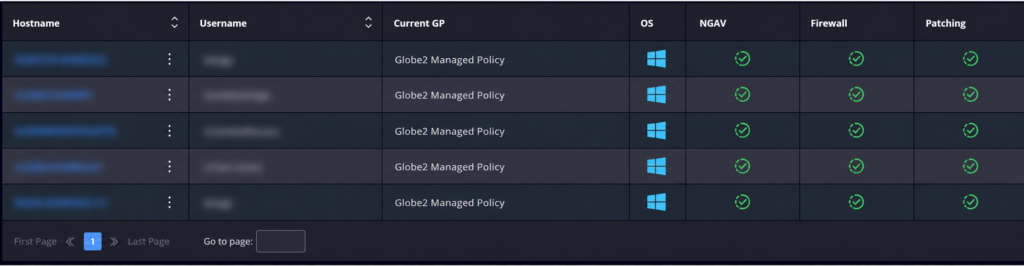
This is one of the biggest differences between simply setting up a computer and providing managed IT support.
A computer may be completely secure when it leaves our hands but gradually become less secure over time.
Updates can fail. Security software can stop working. New vulnerabilities are discovered. Employees install applications. Hardware develops problems. Requirements within the business change.
Our managed approach gives us visibility over the devices we support so that we can identify issues that require attention rather than waiting for the user to notice something is wrong.
This also allows our support team to resolve many problems remotely.
For the customer, that means their IT environment is being actively managed rather than only receiving attention when something breaks.
9. We securely manage employees leaving the business
Employee offboarding is an easily overlooked part of device security.
When somebody leaves an organisation, their access shouldn’t simply remain active indefinitely.
A proper offboarding process can include disabling the employee’s account, revoking active sessions, removing access to company systems, securing company data and recovering company-owned devices.
We can also work with the customer to determine what should happen to the employee’s email, OneDrive files and other business information.
This reduces the risk of former employees retaining access to systems or data they no longer need.
10. We help customers work towards recognised security standards
Many of the controls we use when managing devices also support the requirements of recognised cybersecurity frameworks such as Cyber Essentials.
Cyber Essentials looks at areas including secure configuration, user access control, security update management, malware protection and firewalls.
Rather than treating these as a checklist that is only considered when a business applies for certification, we believe these principles should form part of normal IT management.
Where a customer is working towards Cyber Essentials, we can help identify areas of their IT environment that may need attention and implement appropriate technical changes.
It is important to remember that using a managed IT provider does not automatically make an organisation Cyber Essentials compliant. Compliance depends on the organisation’s complete environment, policies and practices.
Security isn’t a one-time job
The biggest point we want businesses to understand is that securing a device isn’t something that finishes when antivirus software has been installed.
A properly managed business device needs ongoing attention.
Software needs updating. Security tools need monitoring. User access changes. Employees join and leave. New threats emerge. Devices are replaced. Occasionally, something goes wrong and somebody needs to respond.
That is why our approach combines preventative security measures with ongoing management and support.
For Globe2 managed IT customers, our aim is to make security part of the everyday management of their IT environment rather than something that is only considered after an incident.
Want to know how secure your business devices are?
If you are unsure whether your business computers are properly protected, patched and managed, Globe2 can review your current IT setup and identify areas that may need attention.
We provide managed IT support and cybersecurity services for small and medium-sized businesses, helping organisations manage their devices, Microsoft 365 environments, networks and wider IT infrastructure.
Get in touch using the form below to get started with your IT audit.