


Microsoft 365 is one of the most widely used business email platforms, and for good reason. It is reliable, familiar, cloud-based and packed with useful tools for everyday communication. For many businesses, Outlook, Teams, SharePoint and OneDrive have become central to how work gets done.
But because Microsoft 365 is so popular, it is also a major target for cyber criminals.
Attackers know that if they can trick someone into clicking a link, opening an attachment or entering their Microsoft 365 password into a fake login page, they may gain access to emails, files, contacts, payment conversations and sensitive business information.
That leads to a common question:
Is Microsoft 365’s built-in email security enough to protect your business?
The honest answer is: it depends on your licence, your configuration and your risk level. Microsoft 365 includes useful security features, but many businesses benefit from an additional managed layer of email threat protection.
What email security is included with Microsoft 365?
Microsoft includes built-in security features for cloud mailboxes, including protection against broad known threats such as spam, malware and spoofing. Microsoft describes its protection as a “ladder”, starting with built-in security for cloud mailboxes, then moving up to Microsoft Defender for Office 365 Plan 1 and Plan 2, which add more advanced protection and investigation tools.
These features are valuable, and they are much better than having no protection at all. However, they are not always the same as having a fully managed, tuned and monitored email security service.
Why Microsoft 365 is still targeted by attackers
Cyber criminals often target Microsoft 365 because it is where business conversations happen. A compromised mailbox can be used to read sensitive emails, reset passwords, impersonate staff, send fraudulent payment requests or launch further attacks against customers and suppliers.
Phishing is one of the biggest risks. The NCSC describes phishing as scam emails or messages that may contain malicious links, malware, password theft pages or payment fraud attempts. It also warns that phishing can affect organisations of any size and can be part of a targeted attack against a company or individual employee.
The problem is that modern phishing emails are no longer always obvious. They do not always contain poor spelling, strange formatting or suspicious attachments. Some look like genuine Microsoft login prompts, Teams notifications, shared document alerts, invoice reminders or supplier messages.
That is why relying on users to spot every threat is not realistic. The NCSC specifically recommends a layered approach to phishing defence rather than depending only on staff awareness.
Why built-in protection may not be enough on its own
Microsoft 365’s security tools are powerful, but email security is not just about having the tools available. It is about how they are set up, how alerts are handled, how users are supported and how threats are investigated. Furthermore, without additional or enterprise licenses you may not have all the tools required to secure your mailboxes.
Here are some of the common gaps we see.
1. The right features may not be included in your licence
A business may assume it has advanced email security simply because it uses Microsoft 365. In reality, advanced features such as Safe Links, Safe Attachments and enhanced impersonation protection depend on the licence and plan in use.
If your business is using a lower Microsoft 365 plan, you may only have the standard built-in protection, not the full Defender for Office 365 feature set.
2. Security settings may still need configuring
Microsoft 365 includes many security controls, but not all environments are configured to the same standard.
Email authentication is a good example. Microsoft recommends using SPF, DKIM and DMARC together to help protect against spoofing and phishing. It also warns that using less than all of these methods results in weaker protection.
Many businesses have incomplete or poorly configured DNS records. This can affect both security and deliverability.
A proper email security setup should review:
- SPF records
- DKIM signing
- DMARC policy
- Quarantine rules
- Anti-phishing policies
- External sender warnings
- Mail forwarding rules
- Admin permissions
- MFA and conditional access
- User reporting options
3. Microsoft is a large target
Because Microsoft 365 is so widely used, attackers design campaigns specifically to get around common Microsoft security setups.
A phishing email may impersonate:
- Microsoft Teams
- SharePoint
- OneDrive
- Outlook
- Microsoft password reset pages
- Voicemail notifications
- Invoice approval requests
- Supplier payment updates
The email may not always include a traditional virus attachment. It may simply contain a link to a convincing login page designed to steal credentials.
That means email security needs to look beyond obvious spam and malware. It needs to consider links, sender behaviour, impersonation, account compromise and user actions.
4. Business email compromise is different from ordinary spam
Traditional spam filtering is designed to block junk mail, bulk spam and known malicious content. Business email compromise is different.
A business email compromise attack may be carefully written and targeted. It might appear to come from a director, finance manager, supplier or customer. It might not contain malware at all. Instead, it may ask the recipient to change bank details, approve a payment, buy gift cards or send confidential information.
Microsoft identifies business email compromise as a form of phishing that uses trusted or forged senders to trick recipients into approving payments, transferring funds or revealing data.
This is where additional monitoring, impersonation protection and user education become important.
5. Someone still needs to manage the alerts
Security tools are only helpful if someone is looking after them.
For many small and medium-sized businesses, the problem is not that Microsoft 365 has no security features. The problem is that nobody has time to review alerts, tune policies, check quarantined messages, investigate suspicious sign-ins or respond when a user reports a phishing email.
A managed email security service gives you an extra layer of support. Instead of leaving everything to default settings, the service is actively configured and supported around your business.
What is Email Threat Protection?
Email Threat Protection is an additional layer of protection designed to help stop malicious, suspicious and unwanted emails before they reach your users.
It can help protect against:
- Phishing emails
- Malicious links
- Dangerous attachments
- Spoofed senders
- Impersonation attempts
- Malware and ransomware delivery
- Business email compromise attempts
- Suspicious email behaviour
- Spam and unwanted messages
For businesses using Microsoft 365, Email Threat Protection works alongside your existing email platform. The goal is not to replace Microsoft 365, but to strengthen it.
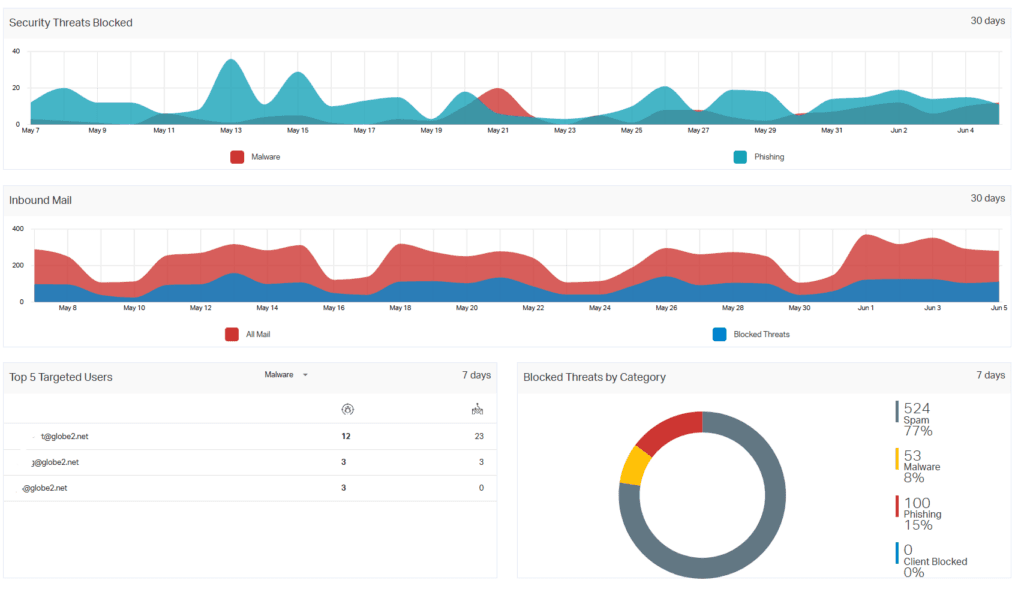
Microsoft 365 security vs Email Threat Protection
Microsoft 365 provides the mailbox platform and a base level of protection. Email Threat Protection adds a dedicated security layer that is easier for many businesses to manage and understand.
| Area | Microsoft 365 built-in protection | Email Threat Protection |
|---|---|---|
| Spam filtering | Yes | Yes, with additional filtering and tuning |
| Malware protection | Yes | Yes, with added threat filtering |
| Phishing protection | Basic to advanced depending on licence | Designed specifically around phishing and email threats |
| Link protection | Licence dependent | Helps inspect and control risky links |
| Attachment protection | Licence dependent | Helps detect dangerous attachments |
| Impersonation protection | Licence dependent and configuration dependent | Helps reduce spoofing and impersonation risk |
| Management | Often left to internal admins | Managed and supported by Globe2 |
| Support | Microsoft/admin-led | Globe2 support team available to help |
When is Microsoft 365’s built-in protection enough?
For a very small business with a low-risk email setup, limited external email volume and a well-configured Microsoft 365 tenant, built-in protection may be acceptable as a starting point.
However, this assumes:
- Your Microsoft 365 licence includes the right features
- SPF, DKIM and DMARC are correctly configured
- MFA is enabled for all users
- Admin accounts are protected
- Mail forwarding is controlled
- Staff know how to report suspicious emails
- Someone regularly reviews alerts and quarantine
- Security policies are not left on weak defaults
If those things are not in place, you may not be as protected as you think.
When should you add extra email security?
You should consider adding Email Threat Protection if:
- Your business relies heavily on Microsoft 365 email
- You receive a lot of invoices, attachments or supplier emails
- Staff regularly receive phishing attempts
- You have finance, HR or management users who are high-value targets
- You want better protection against impersonation and spoofing
- You are not sure whether your Microsoft 365 security is configured correctly
- You do not have time to monitor Microsoft 365 security alerts yourself
- You want a managed service with support from a real team
- You have already had a phishing incident or compromised mailbox
- You want to reduce the risk of ransomware, payment fraud or data loss
For many businesses, the cost of extra protection is small compared with the cost of a compromised mailbox, fraudulent payment or ransomware incident.
What about SPF, DKIM and DMARC?
SPF, DKIM and DMARC are important parts of email security.
In simple terms:
- SPF helps define which servers are allowed to send email for your domain.
- DKIM digitally signs emails to help prove they have not been altered.
- DMARC tells receiving mail systems what to do if messages fail authentication checks.
Microsoft explains that SPF, DKIM and DMARC work together and that using anything less than all of them gives weaker protection against spoofing and phishing.
These records do not stop every phishing email, but they help protect your domain from being spoofed and improve trust in your legitimate emails.
Globe2 can help review and configure these records as part of a wider email security setup.
Email security is not just a technical issue
Good email security is not only about filters and software. It also involves people, processes and response.
A strong email security approach should include:
- Filtering and threat detection
- MFA for user accounts
- Secure admin accounts
- Correct DNS/email authentication
- Regular review of forwarding rules
- User reporting tools
- Clear internal approval processes for payments
- Staff awareness
- A fast response process when something looks suspicious
The NCSC recommends layered phishing defences, including making it harder for attackers to reach users, helping users report suspicious messages, reducing the impact of successful phishing attempts and responding quickly to incidents.
That layered approach is exactly why many businesses choose to add managed Email Threat Protection on top of Microsoft 365.
So, is Microsoft 365’s built-in email security enough?
Microsoft 365 includes useful email security features, but the built-in protection may not be enough for every business.
The answer depends on:
- Which Microsoft 365 licence you have
- Whether Defender for Office 365 is included
- How your security policies are configured
- Whether SPF, DKIM and DMARC are correctly set up
- How likely your business is to be targeted
- Whether anyone is actively monitoring and managing threats
For many small and medium-sized businesses, Microsoft 365 is a strong starting point, but it should not be treated as a complete email security strategy on its own.
A dedicated Email Threat Protection service gives your business an additional layer of defence, better visibility and support from a team that can help when something suspicious happens.
Protect your Microsoft 365 inbox with Globe2 Email Threat Protection
If your business uses Microsoft 365, Globe2 can help strengthen your email security with managed Email Threat Protection.
We can help protect your users from phishing, malicious links, dangerous attachments, spoofing and impersonation attempts, while also reviewing your Microsoft 365 email security setup.
Whether you are unsure what protection you currently have, worried about phishing emails, or want a more managed approach to Microsoft 365 security, Globe2 can help.
Speak to Globe2 about Email Threat Protection and make your Microsoft 365 inbox safer.
FAQ
Is Microsoft 365 email secure?
Microsoft 365 includes built-in email security features such as anti-spam, anti-malware and anti-phishing protection. However, the level of protection depends on your licence, configuration and whether you use additional features such as Microsoft Defender for Office 365.
Do I need extra email security with Microsoft 365?
Many businesses benefit from extra email security, especially if they receive lots of attachments, handle payments by email, use Microsoft 365 heavily or do not have time to manage security alerts themselves.
What is the difference between Microsoft 365 security and Email Threat Protection?
Microsoft 365 provides the mailbox platform and built-in security controls. Email Threat Protection adds a dedicated managed layer to help detect and block phishing, spoofing, malicious links, dangerous attachments and other email-based threats.
Can Microsoft 365 stop phishing emails?
Microsoft 365 can help detect and block phishing emails, especially when correctly configured and combined with Microsoft Defender for Office 365. However, phishing attacks are constantly changing, so a layered approach is recommended.
What is the best email security for Microsoft 365?
The best setup usually combines Microsoft 365 security features, MFA, SPF, DKIM, DMARC, user reporting, secure admin controls and an additional managed email threat protection layer.